Online 3D tour export · macOS

Your tours.
Your files.

Turn your own accessible online tours, or tours you have permission to process, into local files. Export an offline HTML virtual tour, JPEG panoramas, and a textured GLB 3D model.

Keep the files on your Mac, external drive, or NAS. You can also publish the offline tour on your own static web server.

Mac app · Local conversion · Exported files remain yours to use

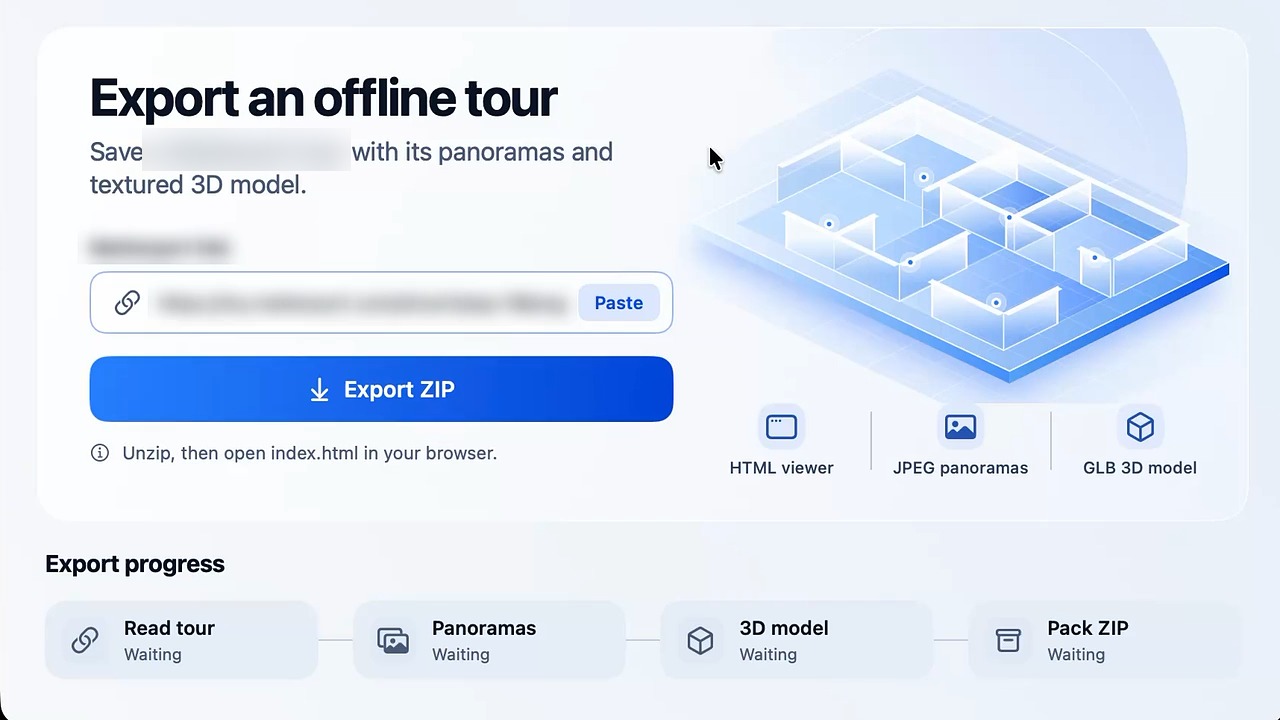
Actual 3DTour Export macOS export screen with source platform details blurred
Source platform changes can affect future conversions. We recommend exporting existing projects promptly after purchase.

How it works

From an accessible link to files you control.

3DTour Export runs on your Mac. The output is a portable file package, ready for local storage or your own static hosting.

  1. 01

    Paste an authorized link

    Start with a tour you own or have explicit client permission to process. It must still be accessible online.

  2. 02

    Convert on your Mac

    Run the export in the local macOS client and let it collect the available tour resources.

  3. 03

    Get a browsable offline tour

    Receive an offline HTML virtual tour that includes panorama images and a textured 3D model when supported by the project.

  4. 04

    Keep or host your files

    Archive the output locally, on a drive or NAS, or deploy the HTML tour to an ordinary static web server.

Product walkthroughFrom local export to offline tour browsing

Export results vary with project format and current compatibility. 3DTour Export is a local conversion tool, not a hosted tour platform or editor.

Pricing

Choose the time you need for your projects.

Pay once. No automatic renewal. During your access period, process an unlimited number of your own projects or client projects you are authorized to handle.

30-Day Access

For a single batch or a focused export window.

$199/ 30 days

One-time payment. No automatic renewal.

  • Use on 1 Mac
  • Unlimited projects for 30 days
  • Your own or authorized client projects
  • Compatibility updates during the access period
  • Exported files remain usable long term

Both plans include the same features. Only the access period differs.

Important information before purchase

Technical changes to a source platform may affect compatibility. If an adaptation is needed during your access period, we provide updated client software to customers with active access, but cannot guarantee that every project will remain compatible. We recommend checking with a real project before purchase and completing your exports promptly afterward. Digital licenses are generally nonrefundable after delivery or activation, except where required by law or in cases such as duplicate charges or failure to deliver a license.

FAQ

The practical details.

Questions about output, compatibility, hosting, and your license.

What can I export?

Compatible tours can be exported as an offline HTML virtual tour, JPEG panorama images, and a textured GLB 3D model. The exact result depends on the project format and current compatibility.

Can I export any online 3D tour?

Only process projects you own or have explicit client permission to handle. We cannot guarantee that every tour can be exported. Some larger projects may take longer to convert. If a conversion is interrupted or fails, you can retry it a few times.

Will all original tour features be preserved?

No. Basic panorama navigation, switching between scan positions, and a textured model can be retained in supported projects. Dollhouse views, floor plan entry points, tags, and other proprietary features may be missing or work differently.

If you need a specific feature, we also offer custom development. Contact support3dtour@gmail.com to discuss it.

Can I host the exported tour on my own server?

Yes. The exported offline HTML tour can be deployed to an ordinary static website environment. Loading speed, cross-origin configuration, and mobile behavior depend on your hosting setup.

Can I still use my exported files after my license expires?

Yes. You cannot start new conversions after your access period expires, but local files successfully generated before then do not expire because of it.

Can updates to the source platform affect compatibility?

Yes. Online tour formats, resource structures, or access methods can change and may temporarily prevent some projects from converting. When that happens, we work to adapt the client as soon as we can. You can also email us with details of the affected project and issue.

Is this an official product of any third-party tour platform?

No. 3DTour Export is independently developed and is not part of any third-party tour platform. We respect the legal rights of platforms and rights holders. If we receive a valid notice, we will assess, adjust, or discontinue the relevant functionality as appropriate.

How do I get support and software updates?

After purchase, email support3dtour@gmail.com. We normally reply within two business days. If an updated client for compatibility is released during your access period, we will also use this email channel to send an update notice or download instructions.